Showing posts with label Apache. Show all posts

Sunday, March 1, 2009

MVC = Make Venerated Code?

In the same spirit as my previous post entitled: "Apache as an MVC controller", I presented on February the 18th a session on the MVC pattern at the first event of PHPBelgium in Liège.
The idea was to transform a simple spaghetti application into a well structured, MVC-aware and framework-free application with nice URL just using regular PHP and Apache's configuration.
You will find all the presentation materials, including source code, at: http://users.telenet.be/patrick_allaert/presentations/20090218_MVC_Make_Venerated_Code/
Here are the slides for the impatient:

Sunday, June 8, 2008

Apache as an MVC controller

My colleagues know I am not a big fan of PHP frameworks, this is probably why I somewhat agree with the no-framework PHP MVC framework of Rasmus Lerdorf or with the idea of Akash Mehta thinking, to an extent, that PHP IS a framework. Keeping this global picture in mind, let me show you how Apache could take the C of MVC.

Because not mixing the business logic and the presentation is always a good idea, this leads up to have two types of PHP files: those with business logic only (the M of MVC), whether it's OOP or procedural programming, and those that are just templates containing mostly HTML (the V of MVC).

Mapping URLs to actions/views is the job of Apache, by default, it will look at your URL and make the match with the corresponding script on the filesystem. This is why I consider Apache as a controller.

Nice URL

One of the goal of a web controller is also to provide nice URL's to your application, I will present you here two methods to achieve this with Apache exclusively.

Method #1

It is quiet common Apache being configured with

DirectoryIndex index.php
Knowing this you can architect your directories with the same structure as your URLs always with an index.php file handling the request. Let's take the example of a web project management application having a dedicated page for projects and users. Your URLs might be:
  • http://project-management/projects/?id=xxx
  • http://project-management/projects/remove/?id=xxx
  • http://project-management/users/?id=xxx
  • http://project-management/users/add/
Handling this could be done using the filesystem layout as shown on the following picture:

Method #2
Another method, which may provide you even nicer URLs, relies on Apache's mod_rewrite. Let's change our URLs a little bit:
  • http://project-management/projects/xxx
  • http://project-management/projects/remove/xxx
  • http://project-management/users/xxx
  • http://project-management/users/add/
To handle this, I use a flatter filesystem layout: with the following rewrite rules:

RewriteEngine On

# Preventing access to php files directly
RewriteRule \.php$ /NotFound [L]

# Simple URL mapping
RewriteRule ^/$ /index.php [L]
RewriteRule ^/users/$ /ListUsers.php [L]
RewriteRule ^/projects/$ /ListProjects.php [L]
RewriteRule ^/users/add/$ /AddUser.php [L]
RewriteRule ^/projects/add/$ /AddProject.php [L]

# URL mapping with captured IDs
RewriteRule ^/users/([0-9]+)$ /ViewUser.php?id=$1 [L]
RewriteRule ^/projects/([0-9]+)$ /ViewProject.php?id=$1 [L]
RewriteRule ^/users/remove/([0-9]+)$ /RemoveUser.php?id=$1 [L]
RewriteRule ^/projects/remove/([0-9]+)$ /RemoveProject.php?id=$1 [L]

The first thing done is preventing direct access to PHP files, this is not mandatory but it adds some more security. The only way to reach the desired script is to match strictly the regular expression making some input filtering at the same time. Then comes the real and interesting rewrite rules. First ones are very simple mapping while the 4 last ones takes care of extracting a numerical ID from the URL and passing it to PHP as a $_GET parameter.

What do you think about such approach? Please, leave some comments :)

Monday, December 3, 2007

Templatize your Apache configuration with mod_macro

Background

In a previous post I presented a way to clean up your Apache's configuration by putting your sites' configuration apart from your httpd.conf. In this one I will show you how to build a scheme to easier the maintenance of your Apache related configuration by avoiding some nasty copy/paste.

Current situation
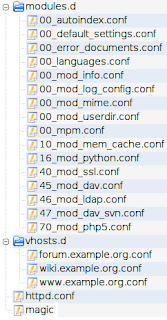
Current apache structure

Let's analyze the structure of the current /etc/apache2/ directory displayed in the picture on the right:

  • httpd.conf is the single entry point for Apache's configuration, it contains the bare minimum configuration needed for the server's instance.
  • modules.d is the directory containing all modules and features configuration files, it is Gentoo's equivalent to handle the mods-enabled directory of Debian and derivatives. Those files are included from the httpd.conf with:
    Include /etc/apache2/modules.d/*.conf
  • vhosts.d is the directory containing all virtual host configuration files as explained in my previous post. This one is the equivalent of sites-enabled. Those files are included the same way than modules.d with:
    Include /etc/apache2/vhosts.d/*.conf

Lets have the configuration of www.example.org, wiki.example.org and forum.example.org all hosted by the same Apache instance.

Content of vhosts.d/www.example.org:

<VirtualHost *:80>
    ServerName www.example.org
    DocumentRoot /var/www/www.example.org

    ErrorLog /var/log/apache2/www.example.org/error_log
    CustomLog /var/log/apache2/www.example.org/access_log common
    php_admin_value error_log "/var/log/apache2/www.example.org/php_error_log"
</VirtualHost>

Content of vhosts.d/wiki.example.org:

<VirtualHost *:80>
    ServerName wiki.example.org
    DocumentRoot /var/www/wiki.example.org

    ErrorLog /var/log/apache2/wiki.example.org/error_log
    CustomLog /var/log/apache2/wiki.example.org/access_log common
    php_admin_value error_log "/var/log/apache2/wiki.example.org/php_error_log"
</VirtualHost>

Content of vhosts.d/forum.example.org:

<VirtualHost *:80>
    ServerName forum.example.org
    DocumentRoot /var/www/forum.example.org

    ErrorLog /var/log/apache2/forum.example.org/error_log
    CustomLog /var/log/apache2/forum.example.org/access_log common
    php_admin_value error_log "/var/log/apache2/forum.example.org/php_error_log"
</VirtualHost>

We may notice that strong conventions are used:

  1. Document root is located in /var/www/$FullyQualifiedDomainName
  2. All logs are stored inside /var/log/apache2/$FullyQualifiedDomainName
  3. Only the $FullyQualifiedDomainName differs from one configuration to another.

mod_macro in action

Because the configuration of the virtual hosts follow all the same rules, this is a perfect candidate for Fabien COELHO's mod_macro. This Apache module lets you define and use macros within Apache runtime configuration files. Just take a look at the following macro:

# Macro definition for a generic virtual host
<Macro VHost $fqdn>
    <VirtualHost *:80>
        ServerName $fqdn
        DocumentRoot /var/www/$fqdn

        ErrorLog /var/log/apache2/$fqdn/error_log
        CustomLog /var/log/apache2/$fqdn/access_log common
        php_admin_value error_log "/var/log/apache2/$fqdn/php_error_log"
    </VirtualHost>
</Macro>

Here is how the content of my virtual hosts configuration:

Content of vhosts.d/www.example.org:

Use VHost www.example.org

Content of vhosts.d/wiki.example.org:

Use VHost wiki.example.org

Content of vhosts.d/forum.example.org:

Use VHost forum.example.org

While this solution is just perfect in case every virtual hosts should be configured exactly the same way (in that case you may be interested in mod_vhost_alias) it doesn't provide much flexibility to modify a specific virtual host afterwards even temporarily. To overcome to this shortcoming, here is my final structure:Updated Apache structure

  • an additional macros.d to holds macros definitions into .conf files loaded with:
    Include /etc/apache2/macros.d/*.conf
  • a home made VirtualHost definition made in two parts:
    # Macro definition for a generic virtual host
    <Macro BeginVHost $fqdn>
        <VirtualHost *:80>
            ServerName $fqdn
            DocumentRoot /var/www/$fqdn

            ErrorLog /var/log/apache2/$fqdn/error_log
            CustomLog /var/log/apache2/$fqdn/access_log common
            php_admin_value error_log "/var/log/apache2/$fqdn/php_error_log"
    </Macro>
    <Macro EndVHost>
        </VirtualHost>
    </Macro>
  • virtual hosts defined with:
    Use BeginVHost www.example.org
        # Define specific virtual host configuration here.
        # Example:
        # Use ZendFramework

    Use EndVHost

Conclusions

This post doesn't attempt to state the best way to manage tons of virtual host configuration, for each environment, there are different considerations to be taken and there's no perfect way. The main reason I wrote this post was to share the lessons learned with mod_macro and Gentoo's way to organize things and maybe helping others to improve their Apache configuration.

Sunday, November 18, 2007

Modularize your apache configuration

First symptoms

The very first time I had to modify something into Apache's configuration, the documentation tells me I had to do so in a file named httpd.conf. With the time, this file became more and more unmanageable: tons of unsorted VirtualHost and Directory blocks mixed with custom changes and Linux distribution specific configuration.

First aid

Everything became cleaner when I modularized the configuration into separate files thanks to the Include directive where every virtual hosts were defined into separate files. The only change made to the httpd.conf was to append:

Include /etc/apache2/vhosts.d/*.conf

Every sites can then be configured into their own vhosts.d/$FullyQualifiedDomainName.conf file.

Example with vhosts.d/wiki.example.org:

<VirtualHost *:80>
    ServerName wiki.example.org
    DocumentRoot /var/www/wiki.example.org

    <Directory /var/www/wiki.example.org>
        AllowOverride None
    </Directory>

    ErrorLog /var/log/apache2/wiki.example.org/error_log
    CustomLog /var/log/apache2/wiki.example.org/access_log common
    php_admin_value error_log "/var/log/apache2/wiki.example.org/php_error_log"
</VirtualHost>

Health check

After this reorganization I was up to disable a site simply by renaming the related .conf file without editing it, every virtual hosts had their own file and, the most important IMO, sites configuration were not mixed with the rest! This is how Gentoo Linux organize its apache's configuration by default. My /etc/apache2 directory now looks like the image on the right.
